

Do you know the feeling when you are writing a report, essay or thesis and are almost done but have to spend another few hours putting in the citations manually? Not only is this insanely tedious, boring, and a major cause for mistakes – it is also completely unnecessary! Today we are going to present to you two of our favourite citation programs that not only remove all the pain points mentioned above but also help you to organize your resources at the same time!
What is a citation program?
There are many names for a piece of software that does this kind of work for you; reference management software, reference manager, citation generator, bibliography tools, etc. Essentially all of these terms describe a software that does somewhat the same task: help you with your citations. They vary greatly in their price, complexity, and usability. So, we have figured to test some of the current programs out there and present you our favourite two. In this case, we chose a paid program for those of you that need to do more complex work, and a free program for shorter papers.
Let’s get started!
What does it do?
So far, we have only vaguely described what a citation program is but what does it do for you exactly? What the program can do varies substantially from program to program but there are certain things that all programs have in common:
It does the work for you
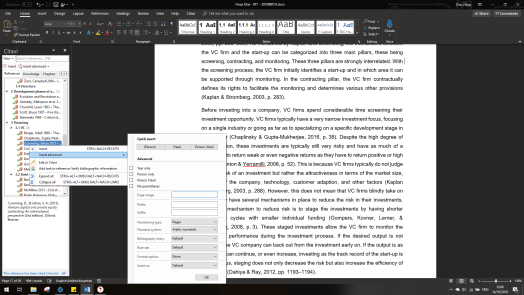
A citation program allows you to add a publication to your virtual library and use it for your upcoming work. This can either be done automatically by including the DOI or ISBN number or manually typing in information such as Author, Title, Place of publication, Date, etc. This entry then includes all information about the book or journal article – all you have to do is write the thesis! Once you come to the point of the citation you simply navigate through the program’s menu and can insert it.
Resource management – Imagine you are writing a bachelor’s thesis with 60 resources; how do you organize them? If you have a hard copy of every resources, then there’s an easy solution but what if you have all of them online? Writing a word document with all the resources and links to them? Not a good idea, you would spend more time typing all the information in there than you would spend on the thesis! Most citation programs snatch the information of the publication automatically and allow you to assign resources to specific chapters and highlight (in our case indicating it with a green arrow) if you have used the resource in your paper or if you forgot it! Sounds a lot more professional and comfortable at the same time, right?
What does it not do?
Get the information – sadly you cannot use a citation program to get the publications for you. You have to use only databases or libraries to get access and read the publications. Only for some papers that are publicly available citations can get the full text excerpt for you. For any publications where you’d have to purchase it this feature is not available.
It is not perfect – depending on the citation style required there can be minor mistakes or inaccuracies. However, all of these can be avoided by customizing the citation style to your needs. If your university has some special way of citing, simply customize the most similar citation style to your need!
Mendeley vs Citavi
Now that you know the basics it is time to showcase the two programs we have picked for you; Mendeley and Citavi!
Mendeley 
Mendeley is a free citation program by Elsevier published in 2008. It works for all major operating systems, Windows, Linux, Mac OS, Chrome OS, and even on mobile platforms such as iOS and Android. To get started one simply has to create an account and install the required desktop, web, and Microsoft Word components. Once you are done Mendeley is all set up and ready to use!
Pro:
- It is free
- Available on almost any platform
- Synching of desktop application to web account
- Online storage space of 2GB
- Easy capturing of web pages, PDF files, and books
- Over 8000 citation styles available
- Microsoft Word plugin
Con:
- “Notes” feature hard to work with
- No citation count
- Only less that 100 references possible per paper
- (Some Users have experienced extensive lag in word when using Mendeley)
Citavi 6:
Citavi is either free if you only need it for papers with less than 100 references or fee-based if you wish to have no limitations. It was published by Swiss Academic Software in 2006 and still receives almost monthly updates. The big downside to it: it is only available for Windows. Mac OS and Linux users have to look for other alternatives, sorry! However, with most universities and students using Windows based notebooks we figured it still makes sense to include it.
Pro:
- Overall easy to use program
- Knowledge organization feature
- Allows to divide references in sub-divisions
- 5gb online storage
- Group work feature
- “Find full text online” feature
- Citation count
Cons:
- Can be pricey if you want all features
- Only available for Windows
- (Microsoft Word plugin is still a bit unstable)
Author’s Recommendation
If you only have to write a short report with less than 5 resources required and you do not have a citation program installed you can also use online applications! For this we recommend using Citation Machine and EasyBib.
If you liked this post, please leave a comment and share with your friends!


Do you have experience with other citation programs and would like to extend this post? Let me know in the comments and I will try to include your suggestions!
LikeLike